Manager Playbook - Running the Floor on LeadrVision
Who this is for: sales managers, team leads, and owners accountable for pipeline, response time, and rep performance. The one-sentence version: every morning, open Home to see what needs you, open Team to see who's slipping, and spend the day driving one number to zero - hot leads sitting unworked.
1. Your job in one idea
LeadrVision already does the hard part: it scores every lead's intent and hands each rep a perfectly ranked call list. So your job isn't lead triage - it's accountability:
Are the hottest leads getting called fast, and is every rep actually working the leads they were given?
Two screens answer that: Home (your morning triage) and Team (rep accountability). Everything else supports those two.
What the AI does and doesn't do
- It does: score intent, rank the queue, fire alerts when leads turn hot / get assigned / go silent, and auto-route + auto-rotate leads (if you enable routing).
- It does not: call, text, or chase customers on its own. People do the outreach. That means the failure mode is simple: a hot lead nobody called. Your whole job is to make sure that doesn't happen.
The cost lever
Scoring uses your workspace's LLM credits. It's controlled in Settings → AI & Scoring (auto-scoring toggle, cooldown between scores, daily cap). Set a sane scoring budget once and move on.
2. Start here every morning: Home (the briefing)
Home is your personal triage. It answers "what needs me right now" in one screen.
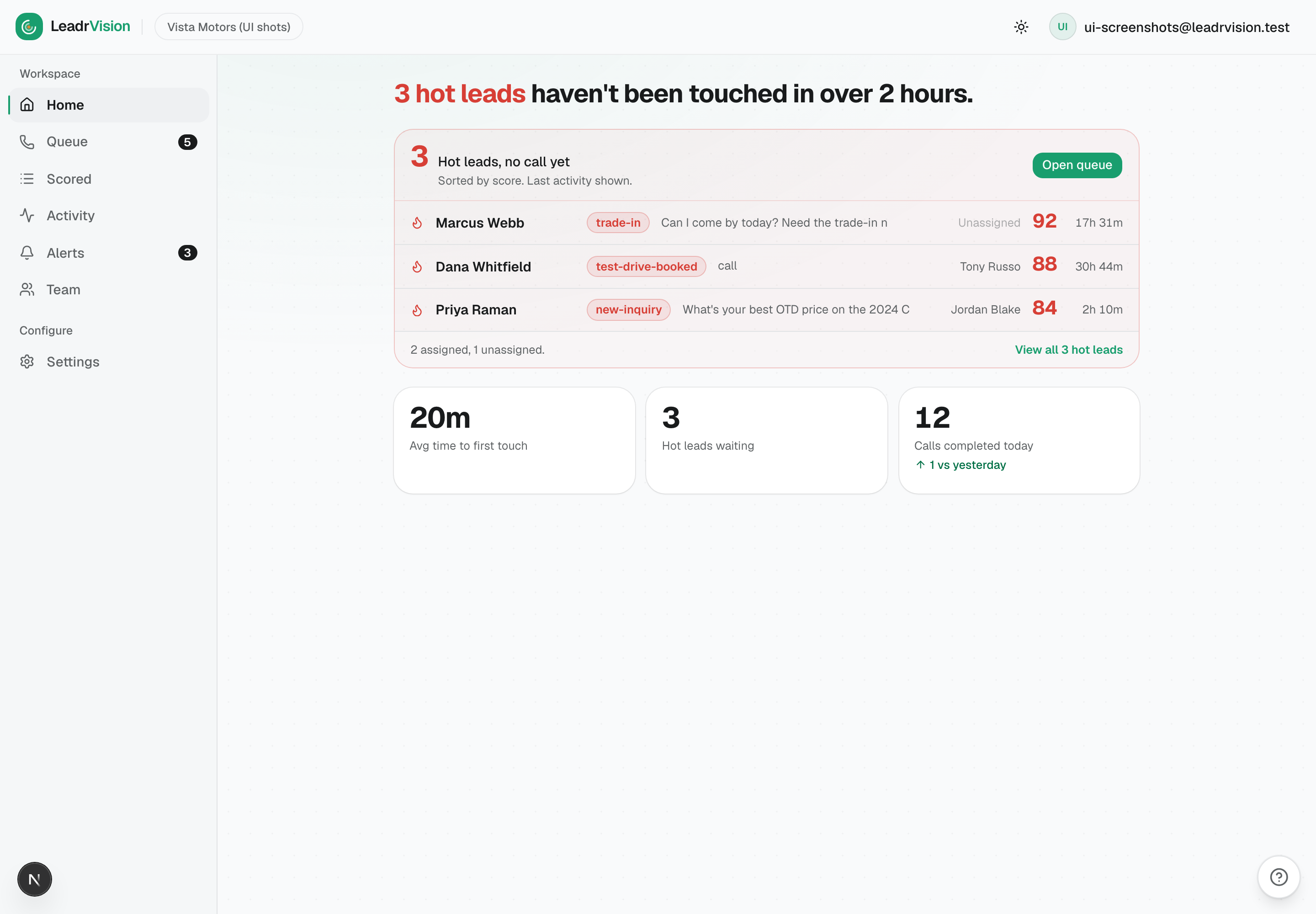
Read it top to bottom:
- The headline - "N hot leads haven't been touched in over 2 hours." This is the number you attack first. Two hours is the line; past it, the customer is shopping elsewhere.
- Hot leads, no call yet - the actual list, sorted by score, each showing the badge, last activity, assigned rep (or Unassigned), score, and how long it's been waiting. Click any to open the dossier; Open queue to send a rep at them.
- Avg time to first touch - average time from a lead turning hot to its first completed call (last 7 days). Your response-speed pulse; lower is better.
- Hot leads waiting and Calls completed today (with the change vs yesterday).
Morning standard: drive "hot leads, no call yet" toward zero before you do anything else. Assign the unassigned ones; chase the assigned ones with the rep who owns them.
3. The accountability surface: Team
The Team page answers "who's working their leads, and what's slipping." It's the heart of management.
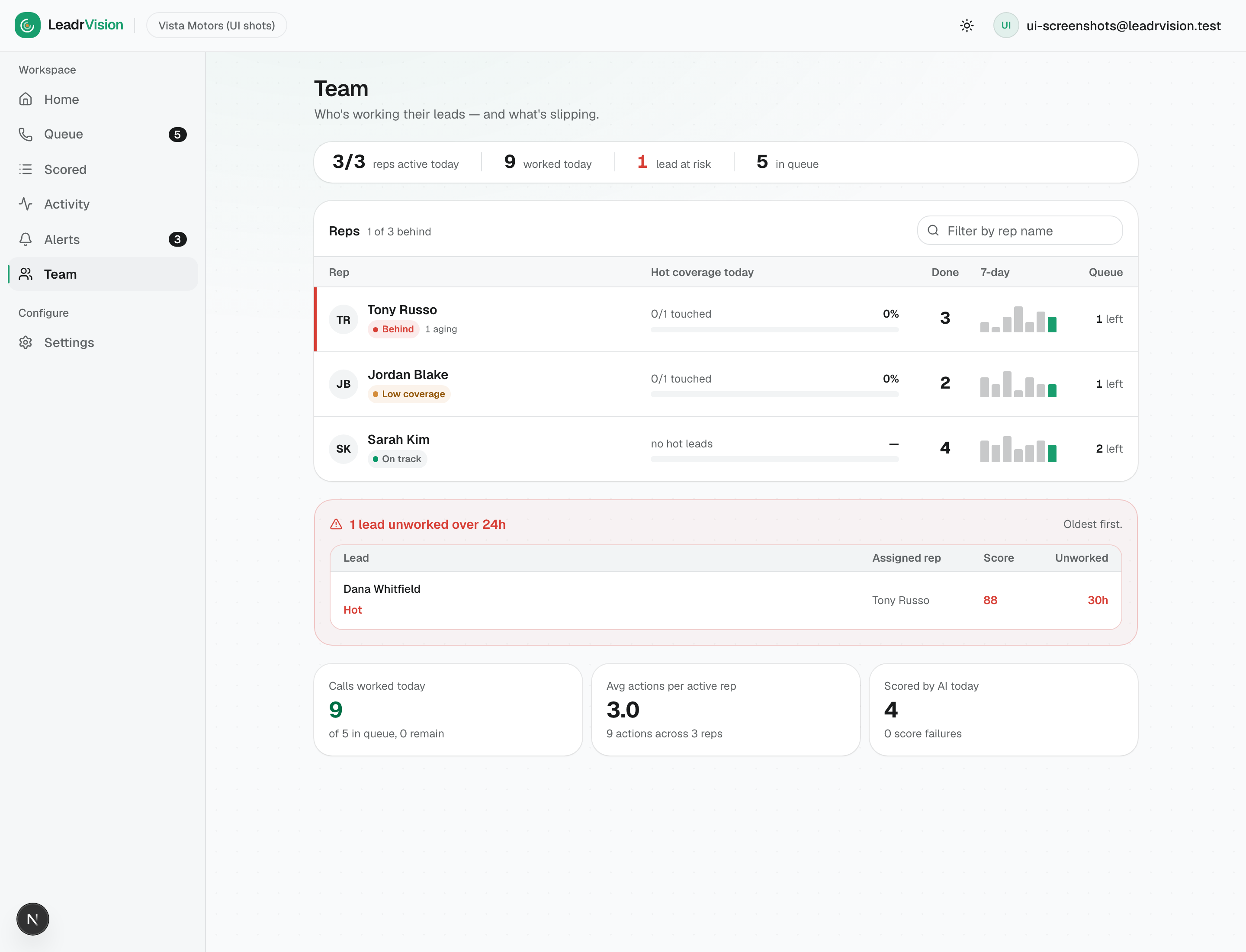
Top strip - team health at a glance
One calm line: reps active today, worked today, leads at risk, in queue. Only "at risk" turns red. A quiet day should read quiet.
Coverage board - one verdict per rep
The hero. One row per rep, worst first, each with a plain verdict:
| Verdict | Meaning | What you do |
|---|---|---|
| 🔴 Behind | Assigned leads are aging unworked (24h+). | Intervene now - call the rep, reassign, or work it yourself. |
| 🟠 Low coverage | Has hot leads assigned but has touched under 60% of them today. | Nudge - they're active but not on their hot leads. |
| 🟢 On track | Working their leads. | Leave them alone. |
Each row also shows hot coverage (touched / assigned, as a %), Done today, a 7-day momentum sparkline, and queue remaining. Use the filter to find a specific rep.
At-risk strip - the leads slipping away
Below the board: leads unworked over 24h, oldest first, each named with its assigned rep, temperature, score, and age. Click straight through to the lead. This is your reassign/escalate list.
Throughput footer
Calls worked today, avg actions per active rep, scored by AI today, and score failures (a non-zero failure count means scoring is unhealthy - check Settings).
Standard: no rep ends the day Behind. No hot/warm lead sits in the at-risk strip overnight. If a rep is buried, reassign their aging leads (from the dossier's Assign control, or enable SLA rotation to do it automatically - see §6).
4. Going deeper: Scored and the Queue
Scored lists every lead the AI has scored - a superset of the queue. Use the quick-view chips (Not in queue, High value, No contact 2h, Unassigned) to audit: e.g., Unassigned + Hot finds hot leads with no owner; No contact 2h finds neglected leads.
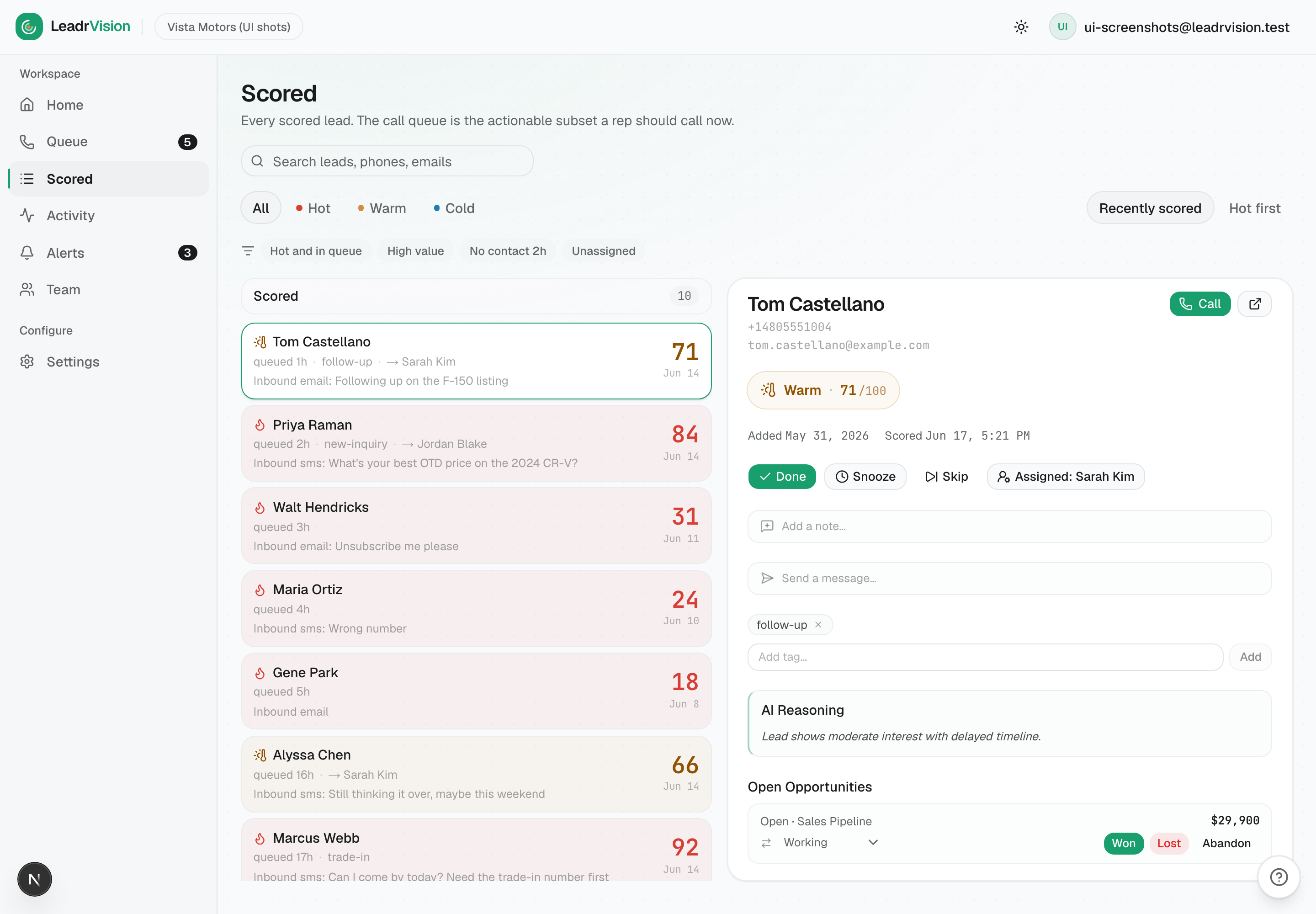
Queue shows the actionable call list across the whole team (managers see all reps, with assignee names and a reassign control on each dossier). Use the per-rep filter to see exactly the queue any one rep is looking at, and reassign on the fly.
5. Alerts - make sure the right events fire
Alerts are how the floor learns a lead just turned hot, got assigned, or went silent. You configure them in Settings → Alerts.
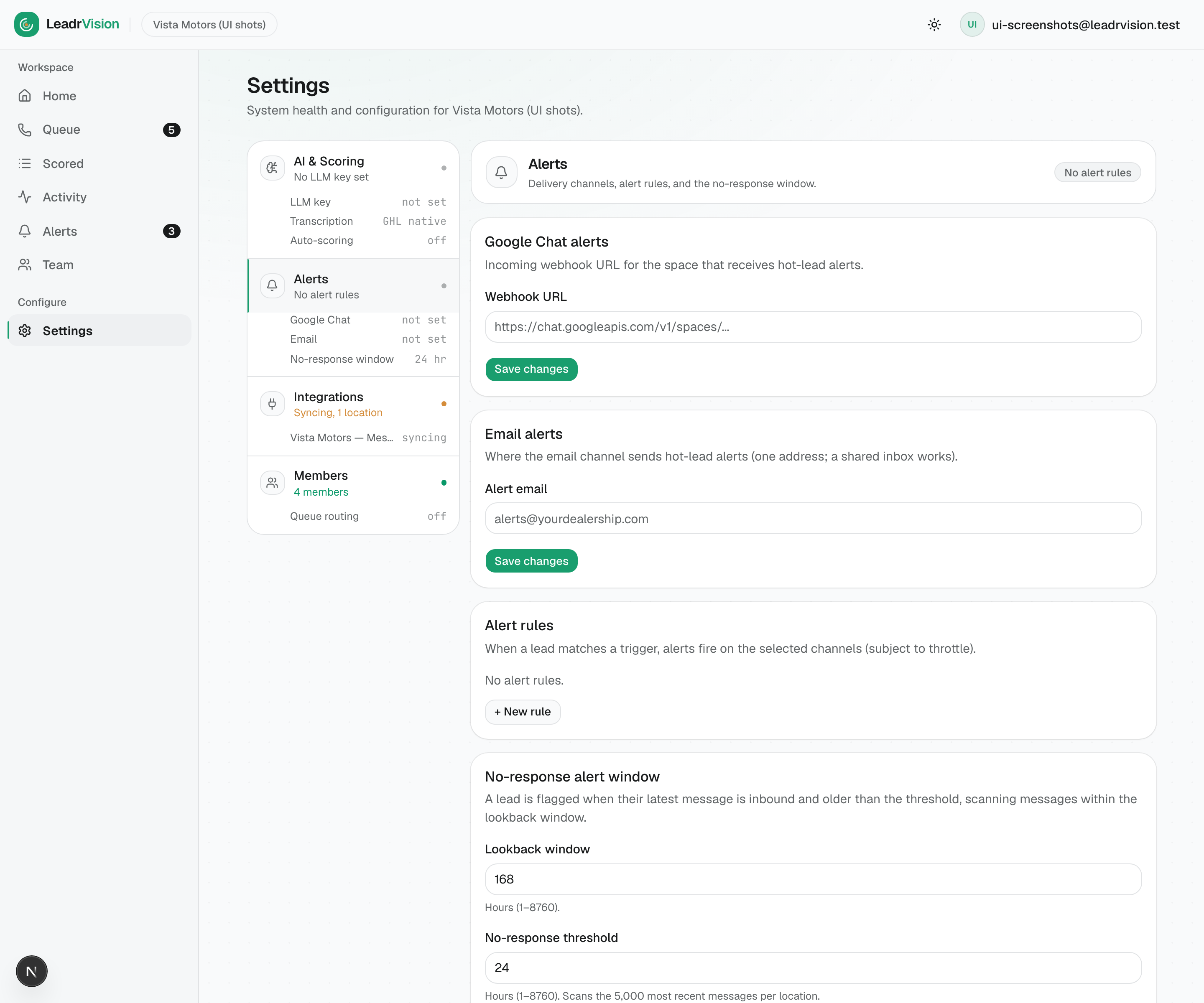
- Google Chat alerts - paste your Google Chat space's incoming webhook URL to pipe alerts into a team chat room.
- Email alerts - one address (a shared inbox works) for hot-lead emails.
- Alert rules - + New rule to define a trigger (e.g. lead turns hot, lead assigned) and the channels it fires on. Rules are subject to the throttle so you don't spam the floor.
- No-response window - flags a lead when its latest message is inbound and older than your threshold (e.g. 24h), scanning within the lookback window. This is your "a customer messaged us and nobody answered" safety net.
Standard: have at least a hot-lead rule and a lead-assigned rule live, on a channel reps actually watch (in-app Alerts is always on; Email/Chat are extra reach). Set the no-response threshold to match your promised response time.
6. Team setup: Members, roles, and routing
Settings → Members is where you build the team and decide how leads get distributed.
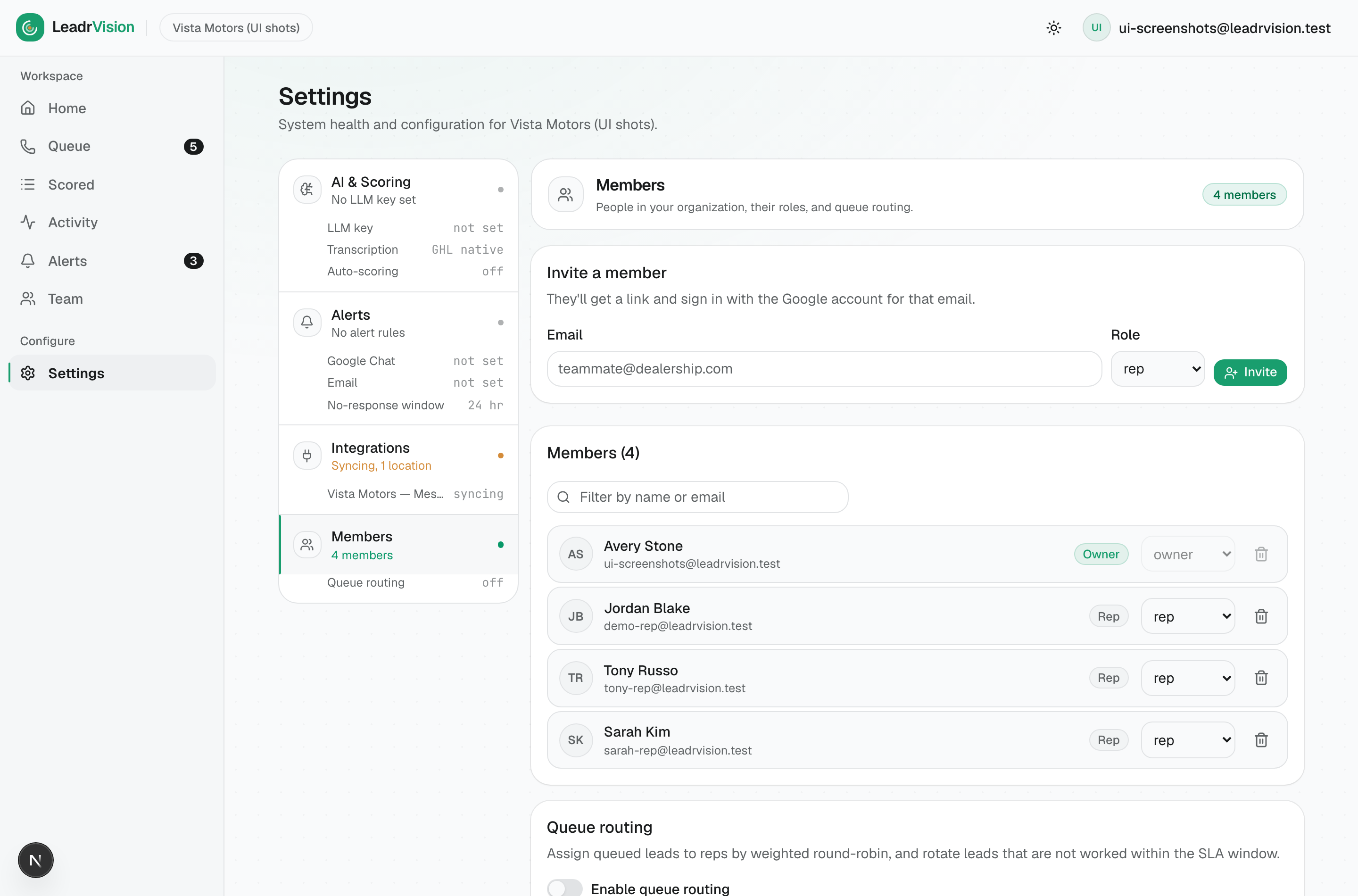
- Invite a member - email + role (Owner / Admin / Manager / Rep). They sign in with that Google account.
- Members roster - change anyone's role or remove them. (Roles: Reps see only Next call + Alerts; Managers/Owners/Admins get Home, Scored, Activity, Team, and Settings.)
- Queue routing - turn this on to assign queued leads to reps automatically (weighted round-robin) and rotate leads that aren't worked inside the SLA window to another rep. This is your automated backstop against the "Behind" rep - an unworked lead gets handed to someone who will work it, and a
lead_assignedalert fires.
Recommendation: enable queue routing once your reps are trained. Until then, assign manually from the dossier so you stay in control of who gets what.
7. Scoring configuration: AI & Scoring
Settings → AI & Scoring controls the brain and the spend.
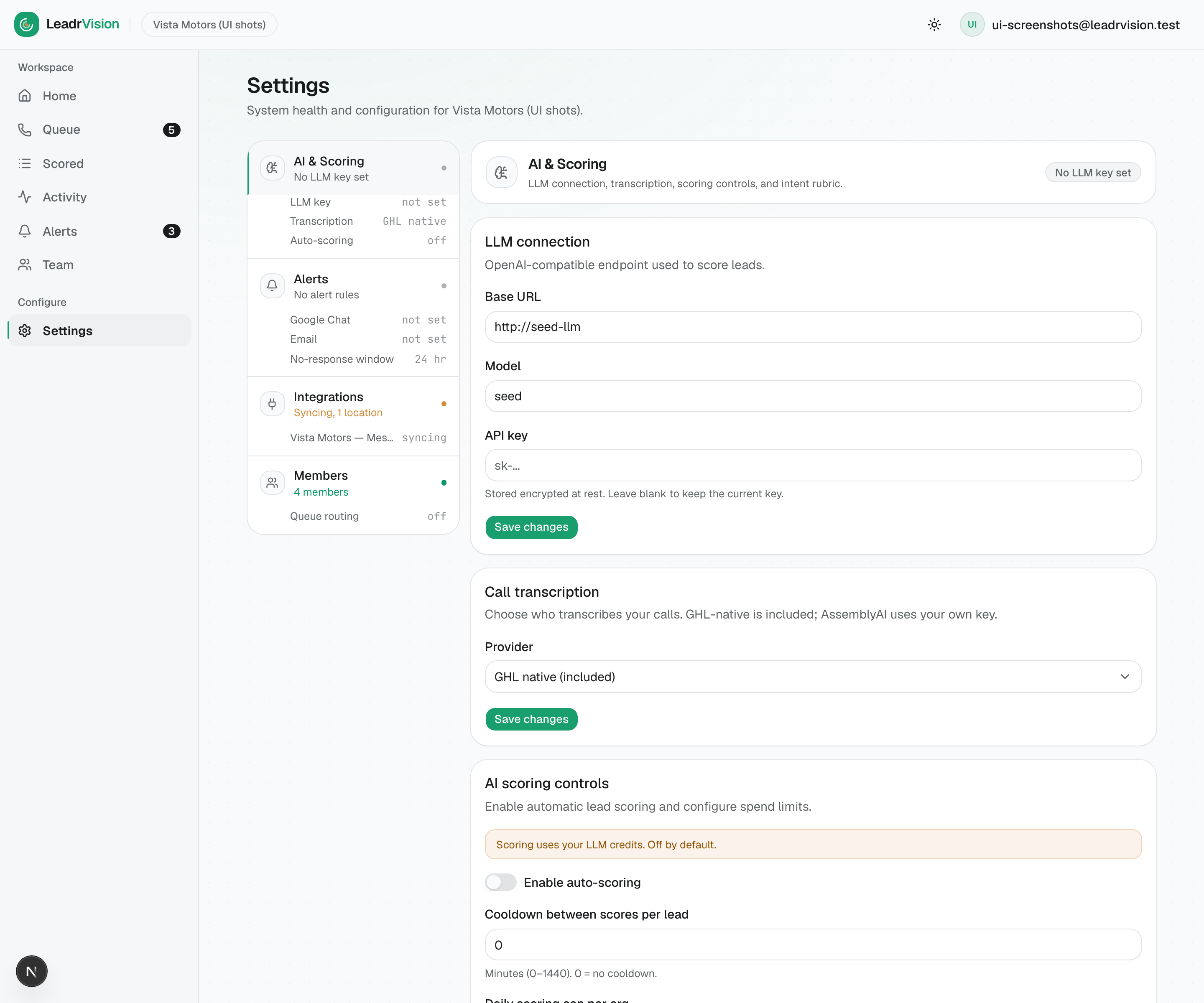
- LLM connection - your OpenAI-compatible endpoint, model, and API key (stored encrypted). This is your business's own key - leads can't be scored without it.
- Call transcription - GHL-native (included) or AssemblyAI (your key) for richer transcripts.
- AI scoring controls - Enable auto-scoring, plus a cooldown between scores and a daily cap. This is your cost dial: more frequent scoring = fresher intent = more credits.
- Intent rubric - the scoring criteria the AI uses (further down the page). Tune it to what "ready to buy" means for your business.
Watch for: a red "score failures" count on the Team footer, or a scoring-health warning on Home - usually a bad/expired LLM key. Fix it here; leads stop scoring until you do.
8. Integrations: the GHL connection
Settings → Integrations shows your GoHighLevel connection and its sync status. From here you can pause / resume polling for a location or disconnect. A healthy connection is what keeps leads flowing in and rep actions flowing back out.
If reps report "no new leads," check that the connection here is healthy (not paused).
9. Your daily oversight routine
In order, every morning - then spot-check through the day:
- Home - drive "hot leads, no call yet" toward zero. Assign the unassigned, chase the assigned.
- Team → coverage board - anyone Behind? Intervene. Anyone Low coverage? Nudge.
- Team → at-risk strip - reassign or escalate every lead unworked 24h+.
- Scored → Unassigned + Hot - make sure no hot lead is ownerless.
- Glance at the footer - score failures at zero? Calls trending the right way?
- Confirm appointments are being defended (ask reps; check upcoming).
- Throughout the day: keep your own Alerts clear and reassign as reps get buried.
10. What "good" looks like
- Zero reps end the day Behind.
- No hot/warm lead in the at-risk strip overnight.
- "Hot leads, no call yet" at or near zero by mid-morning.
- Calls completed trending up; response time down. (First contact in minutes, not hours.)
- Score failures = 0. Scoring healthy, pipeline always graded.
- Appointments created ≈ appointments completed. Confirmed in advance, defended.
The system tells a story over time. Your job is to keep it trending the right way.
See also: Manager Quick Reference (one page) and the Rep Playbook (so you can coach to it).